Home/Products/DS Weight & Balance
Flagship · EFB Weight & Balance

Last-minute change, handled in seconds

Our industry-leading EFB W&B software is recognised by operators worldwide. It is part of the next-generation suite of apps for pilots, loadmasters and flight operations engineers.

Closed loop

One synchronised loadsheet for the whole crew

Calculating the balance and trim of an aircraft is a critical exercise. DS W&B has been developed and refined continuously since 2009, with reliability as its primary design goal.
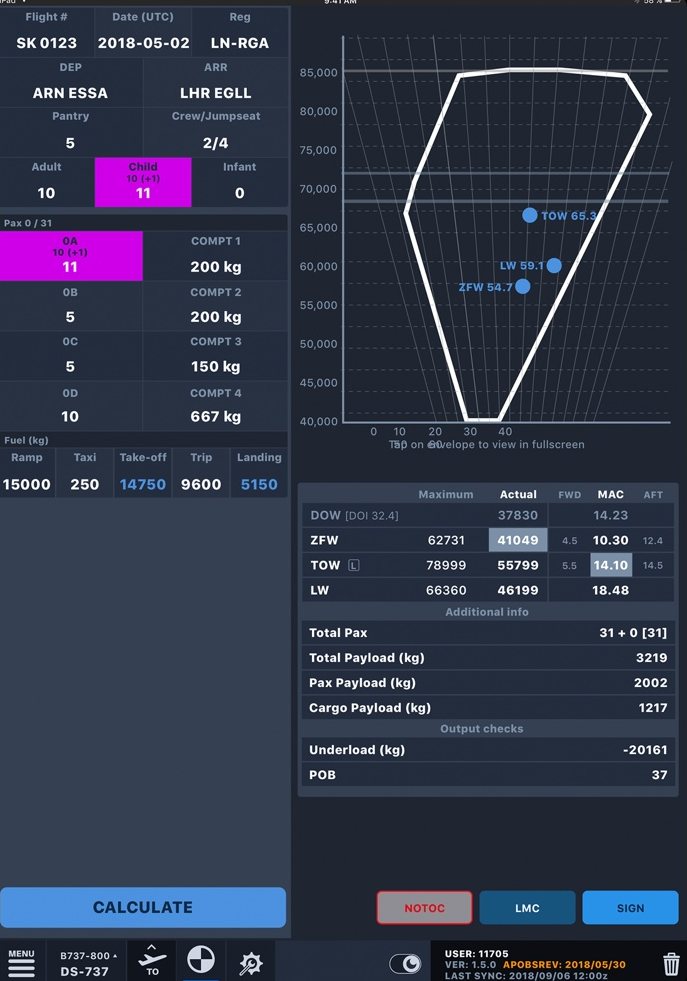
  • Intuitive user interface with industry-leading clarity
  • Crew devices connected and synchronised for closed-loop operation
  • Multi-leg flights linked to a single subscription
  • Balance sheet envelope instantly generated
  • Crew sign loadsheet and NOTOC simultaneously with secure, authority-approved biometrics
DS Weight & Balance loadsheet with balance envelope, actual application screenshot
Overview

From your fleet data to a signed loadsheet

Everything DS Weight & Balance does, in one view. Fleet data you maintain becomes a signed loadsheet on the flight deck, produced however the operation needs, and kept in step through every change. Each stage is shown in detail below.

DS W&B · OVERVIEW
01FLEET DATAAHM 565, held in JAWSreviewed and published02LOADSHEETsubscribed or by handon the EFB, online or offline03SIGNEDbiometric signaturewith the NOTOC04IN SERVICEconnected to your systemsevery edition retained
01
FLEET DATA
AHM 565, held in JAWS · reviewed and published
02
LOADSHEET
subscribed or by hand · on the EFB, online or offline
03
SIGNED
biometric signature · with the NOTOC
04
IN SERVICE
connected to your systems · every edition retained
SHEET · START
SUBSCRIBED
Figures arrive
SYNCHRONISED
MANUAL
Created on the device
STANDALONE
LIMITS
Structural and performance
APPLIED
CROSSCHECK
Against the calculation
OPTIONAL
Getting started

Two ways onto the loadsheet

Subscribe to a flight and the figures arrive on the sheet, with the crew devices held on the same edition. A loadsheet can also be created manually on the device, which is how a station with no connectivity still produces one.

  • Subscribe to a flight and the figures arrive on the sheet
  • Crew devices synchronised on subscribed loadsheets
  • Manual loadsheets created on the device, no connection required
  • Structural and performance limits applied either way
LoadCloseout

The loadsheet reaches the flight deck

LoadCloseout is the weight and balance module on the flight deck. It subscribes the device to a flight, receives the preliminary loadsheet, the final loadsheet and the NOTOC as they are issued, and carries the weights into the performance calculation.

  • Flight list with subscription, filtered to your own flights or all of them
  • Preliminary loadsheet, final loadsheet and NOTOC received as they are issued
  • Crew notified on arrival, and each arrival checked against the flight and version it belongs to
  • Takeoff weight carried into the performance module on the crew’s action
LOADCLOSEOUT
SUBSCRIPTION
Flight list
CONNECTED
PRELIM
Received and checked
CURRENT
LOADSHEET
Final received
NOTIFIED
TO PERFORMANCE
Takeoff weight
ON CREW ACTION
OFFLINE · STATION
CONNECTION
None available
OFFLINE
SHEET
Created and signed on device
COMPLETE
GROUND COPY
Digital or paper
HELD
UNSENT
Sent when connectivity returns
AUTOMATIC
Offline

A station with no connectivity still produces a loadsheet

The sheet is created, calculated and signed on the device. A copy is held on the ground before the aircraft departs, digitally or on paper, and anything still unsent goes out on its own once connectivity returns.

  • Calculation and biometric signature on the device
  • A copy of the loadsheet held on the ground before departure
  • Digital or paper, whichever the station can produce
  • Unsent loadsheets sent automatically when connectivity is re-established
Late change

A last minute change recalculates the sheet

The change goes into the sheet and the figures are worked out again, so the weights and trim on the signed sheet are the ones the aircraft departs on.

  • Change applied to the sheet and the figures recalculated
  • Trim and limits rechecked on every change
  • Superseded editions retained alongside the current one
  • The commander signs the revised sheet
LATE CHANGE
CHANGE
Applied to the sheet
EDNO 3
FIGURES
Recalculated
CURRENT
TRIM
Rechecked
IN LIMITS
SIGNATURE
Taken again
TIMESTAMPED
FLEET · REVIEW AND PUBLISH
FLEET DATA
AHM 565, held in JAWS
CENTRAL
CHANGE
Staged off live operations
STAGED
REVIEW
Differences shown before release
REQUIRED
PUBLISH
Administrators, then all crews
VERSIONED
Fleet management

The data behind every loadsheet, under your control

The weight and balance data for your fleet is held in JAWS and maintained by your own administrators. A change is staged off live operations, reviewed with the differences shown, and reaches the flight deck only when you publish it.

  • Fleet data held centrally in AHM 565 and synchronised to the EFB
  • Changes staged off live operations until you publish them
  • Every change reviewed, with the differences shown, before release
  • Published to administrators first, then all crews, each version timestamped and checksummed
Integration

Integrates with your existing systems

Push load data from third-party vendors over API and connect to the systems you already run. Finished sheets reach the systems that need them over the API, through the browser, or by hand.

  • AHM 565 import function with sanity checks
  • Connects to the departure control and flight planning systems you run
  • Submitted over the API, in the browser or by hand
  • All logs stored in our cloud, with access anytime via JAWS
INTEGRATIONS
DEPARTURE CONTROL
Load data push · API
CONNECTED
FLIGHT PLANNING
Flight plan link
CONNECTED
AHM 565
Import · sanity checks
VALIDATED
DS PERFORMANCE
TOW → calculation
SYNCED
NOTOC · DRILL CODES
UN 1845
Dry ice · 240 kg · CPT 4
DRILL 9
UN 3480
Lithium ion batteries · CPT 1
DRILL 9F
CREW BRIEF
Displayed & acknowledged
SIGNED
EDNO
Revision 2 · synced to crew
CURRENT
NOTOC

NOTOC and dangerous goods, clearly presented

The Notification to Captain is displayed in the same clear interface, with the applicable drill codes parsed out, so nothing is buried in paperwork.

  • NOTOC displayed alongside the loadsheet
  • Applicable drill codes parsed out automatically
  • Signed simultaneously with the loadsheet
  • Compatible with iOS, Android and Windows

Would you like an online demo?

See a last-minute change re-signed in seconds, on your aircraft types.